Overview:
Setting up the Bank Reconciliation Opening Balance establishes the starting point for future bank reconciliations in N3 AI Accounting. This process ensures that your records align with your bank statement as of your cut-off date, especially when you are newly implementing or migrating from another accounting system.
In N3 Accounting, you do not manually enter the bank statement’s opening balance amount. Instead, you record only the uncleared items—such as cheques or deposits that have not yet cleared the bank as of your last reconciliation. These uncleared items are carried forward automatically into your first reconciliation, where you will then enter the actual bank statement closing balance.
Entering uncleared items correctly prevents discrepancies, supports accurate matching during your first reconciliation period, and ensures the system reflects your true starting position without affecting existing journal entries.
Scenario:
A company begins using the accounting system in April. The finance team needs to reconcile their bank account for the first time in the system. The bank statement shows a closing balance of ₱52,350.00 on March 31, which will become the opening balance for April in the reconciliation module.
To ensure accurate reconciliation for April transactions, the accountant sets the Bank Reconciliation Opening Balance to match the bank statement balance as of March 31.
Your company transitions to N3 AI Accounting on January 1, 2023. Your last completed bank reconciliation was for the period ending December 31, 2022 with a closing balance of ₱42,560.00. Three cheques issued in late December had not yet cleared the bank:
Cheque #1543 – ₱15,000
Cheque #1544 – ₱8,050
Cheque #1546 – ₱14,500
Because these cheques were released but not yet cleared, they are considered uncleared items. Instead of entering the ₱42,560.00 opening balance directly, you will record only these uncleared cheques in the Bank Reconciliation Opening Balance screen. N3 AI Accounting will automatically carry them over to your first reconciliation for January 2023, where you will then enter the actual bank statement closing balance.
This ensures the system starts with the correct adjusted position and accurately reflects your outstanding items without creating additional journal entries or affecting your books.
Procedure:
1. Go to Banking > Bank Reconciliation OB
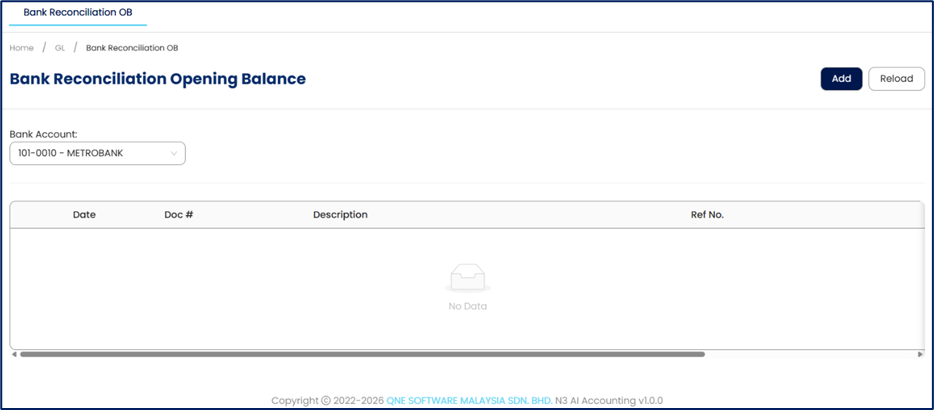
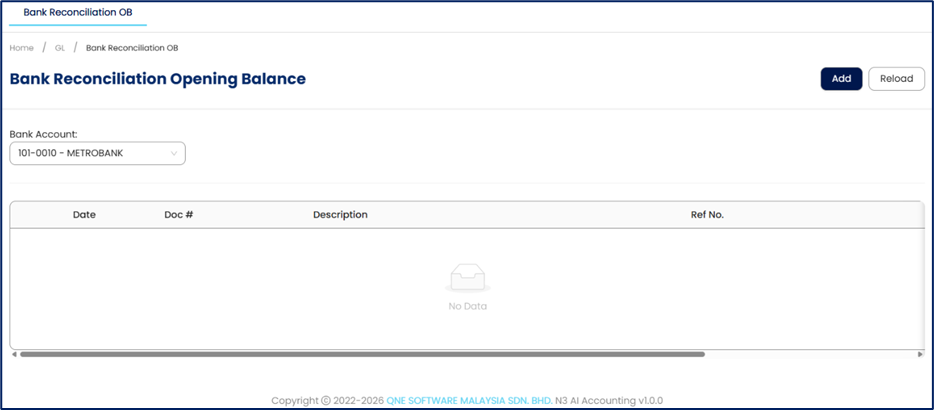
2. Select Bank Account that requires an opening balance setup
3. Click Add to create new uncleared cheque
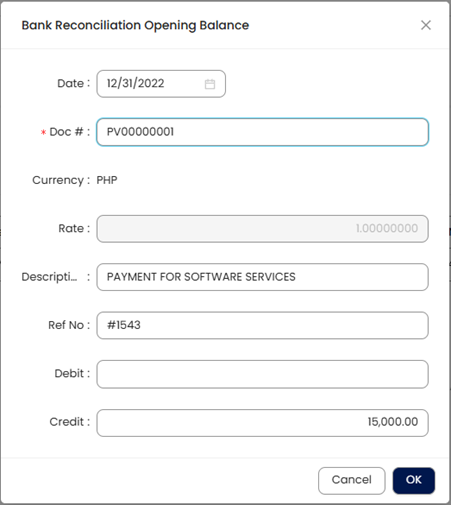
4. In the Pop-up window, enter the cheque details
Date – Cheque or deposit date
Doc # - Document Number
Description – Brief Description of the transaction
Ref No – Cheque number or reference number
Debit / Credit – Amount based on nature of transaction
Uncleared disbursement cheques are recorded as Credit (reduce bank balance)
Uncleared Deposits are recorded as Debit (increase bank balance)
5. Click OK to save
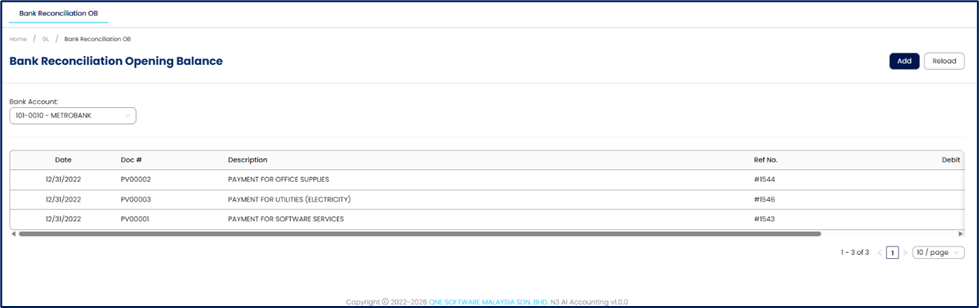
6. Review the list of uncleared items displayed on the screen. Verify that each entry has the correct date, reference number, amount, and transaction type (cheque or deposit). You may edit or remove any item if needed before proceeding
Important Note:
You do not enter the bank statement’s opening balance (e.g., ₱42,560.00) during this setup. N3 AI Accounting automatically carries the uncleared items into your first Bank Reconciliation, where you will input the actual bank statement closing balance for the period.
Both the opening balance items and uncleared cheques or deposits entered here appear in the Bank Reconciliation module for tracking purposes only. They do not create additional journal entries or affect your accounting books.
Application:
The Bank Reconciliation Opening Balance feature is commonly used in the following situations:
First-Time Bank Reconciliation Setup
A company began using a new accounting system in May. The accountant sets the Bank Reconciliation Opening Balance to match the bank statement closing balance so the first reconciliation starts with the correct balance.Migration from Another Accounting System
A business transfers its financial records from a previous system. Before continuing monthly reconciliations, the finance team enters the opening balance from the most recent reconciled bank statement to ensure continuity of records.Restarting Bank Reconciliation After Data Correction
An accountant discovers that earlier reconciliations contained incorrect entries. To correct the records, the reconciliation process is reset and a new opening balance is entered based on the latest verified bank statement.Beginning Reconciliation for a Newly Added Bank Account
A company adds a new bank account to the system for operational use. The accountant records the opening balance based on the account’s current bank statement balance before reconciling new transactions.
System Scope: QNE AI Cloud Accounting / N3 AI Accounting
Was this article helpful?
That’s Great!
Thank you for your feedback
Sorry! We couldn't be helpful
Thank you for your feedback
Feedback sent
We appreciate your effort and will try to fix the article