
Overview:
The Purchase History Inquiry feature in QNE AI Cloud Accounting allows purchasing officers and accounts payable staff to quickly access and review historical purchase transactions for suppliers or stocks—without generating full-scale reports. Unlike standard reports, which require generation and export, the inquiry screen displays results instantly based on your selected filters. This enables users to track supplier activity, analyze purchase trends, and make informed procurement decisions more efficiently.
Important term: Purchase History Inquiry — the inquiry screen or module where you select filters to view a list of past purchase transactions.
Scenario:
As a Purchasing Officer preparing for quarterly supplier negotiations, you need to review how much your company has purchased from a key supplier over the past year and which items were bought most frequently. Instead of running multiple purchase reports, you use the Purchase History Inquiry feature to instantly display the supplier’s historical transactions. The insights help you evaluate supplier performance and identify opportunities for better pricing or consolidated purchasing.
Procedure:
- In the Navigation Pane go to Inquiry > Purchase History Inquiry.
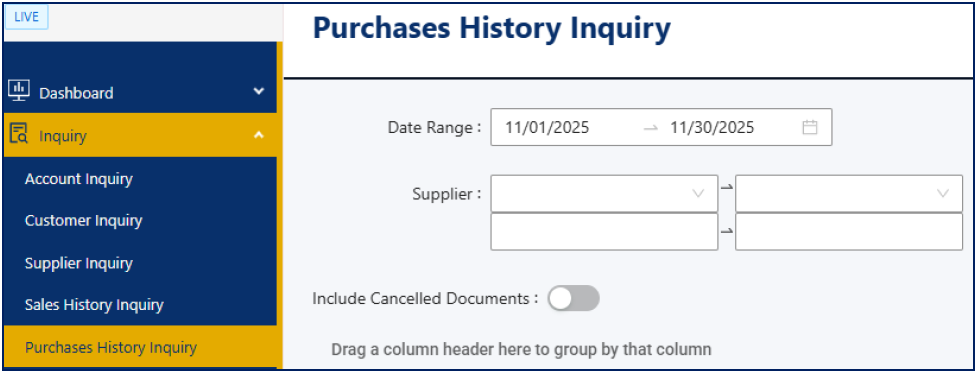
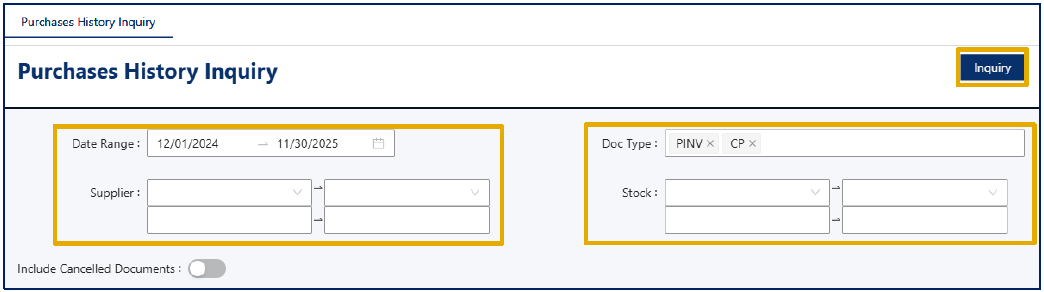
- In the Purchase History Inquiry screen, set the appropriate filter fields:
- Supplier – select a supplier or leave blank to include all
- Stock – Choose one or more items.
- Date Range – Specify your preferred date range (e.g., 12/01/2024 to 11/30/2025).
- Doc Type – select the document type (e.g., Purchase Invoice, Cash Purchases)
- Click the Inquiry button.
- The system returns a list of transactions, showing columns such as Doc Date, Doc Code, Supplier Name, Stock Code and Stock Description.
- If needed, click the Export to Excel icon to save the list for sharing or further analysis.
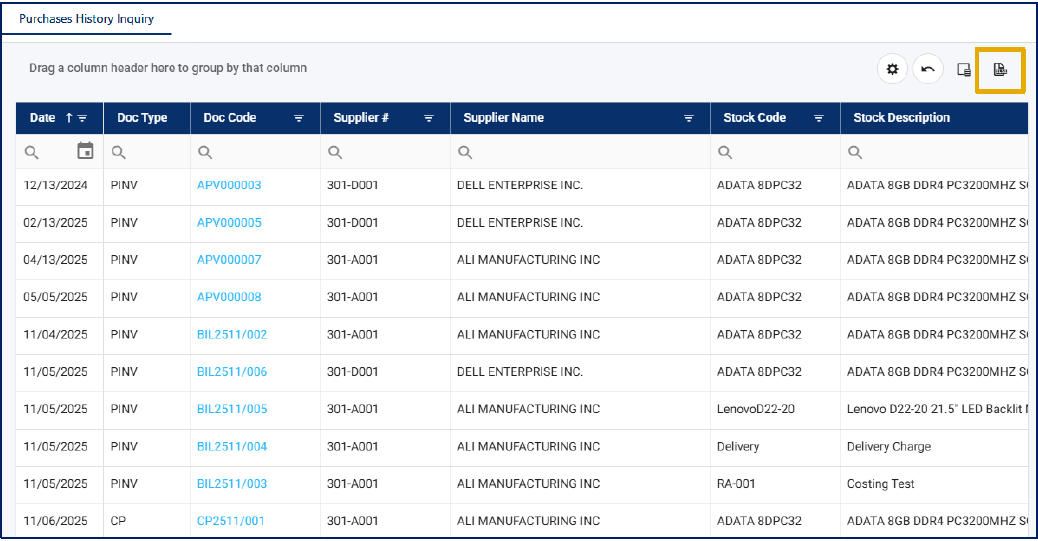
Note: You can click on the Document Code or the View link in the Action column to open the source document and view full transaction details.
- Once the list reflects your filter criteria, your inquiry is complete.
Application:
The Purchase History Inquiry feature can be used in multiple practical ways:
- Monitor item purchase trends — retrieve all transactions for a key product over a specified period to identify seasonal patterns or slow movers.
- Review supplier’s purchase history — determine ordering patterns, outstanding invoices, or opportunities for bulk discounts.
- Support audit or compliance reviews — quickly access historical purchase transactions without waiting for full report generation.
- Inform Procurement Strategy — analyze which supplier or department accounts for the most purchases, enabling better negotiation, planning, or training.
- Budget Review — identify historical spend to improve budget forecasting.
- Departmental Analysis — track purchases by department to identify efficiency or overspending patterns.
With Purchase History Inquiry, you can gain quick insights into your purchasing activity — without the need for complex reports.

Was this article helpful?
That’s Great!
Thank you for your feedback
Sorry! We couldn't be helpful
Thank you for your feedback
Feedback sent
We appreciate your effort and will try to fix the article