
Overview:
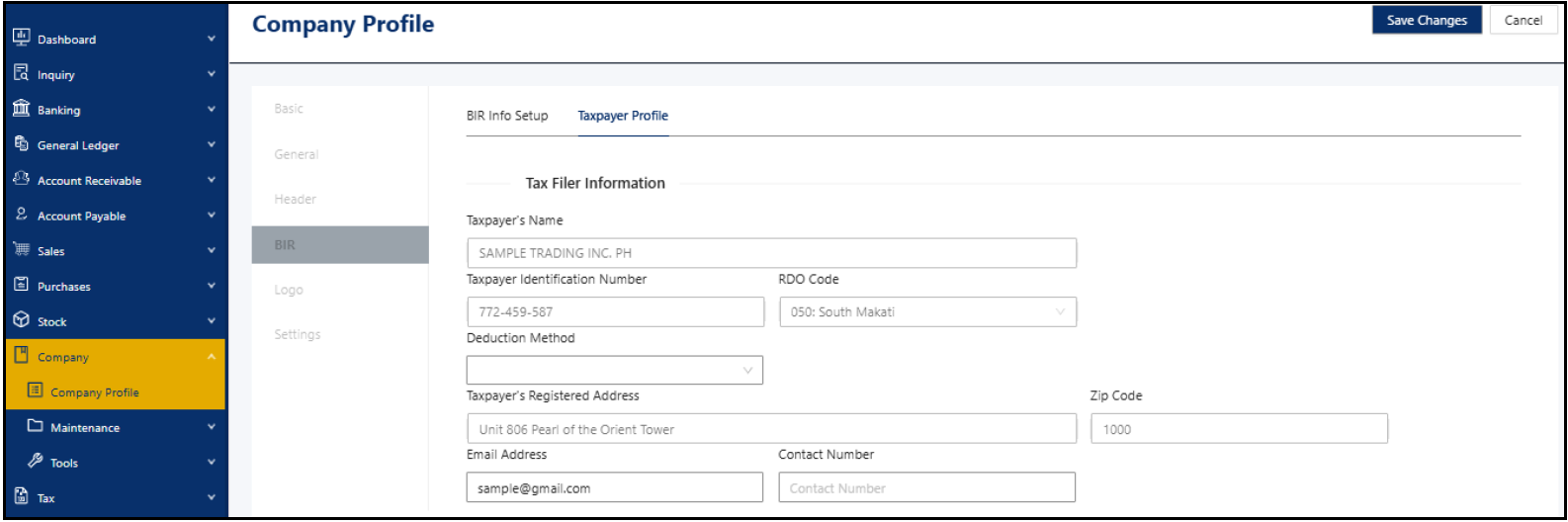
The Taxpayer Profile is a dedicated section under Company Profile that stores taxpayer-specific information required for tax reporting and compliance. It centralizes details such as registration numbers, filer type, income source, tax rates, and filing-related attributes. The fields displayed in the Taxpayer Profile dynamically change based on the company’s Classification, which can be either Individual or Non-Individual. This ensures that only relevant taxpayer information is captured for accurate tax reporting.
Scenario:
An accountant is setting up a newly created company to prepare income tax filings. To ensure that tax forms reflect the correct filer information, income source, and applicable tax rules, the Taxpayer Profile under Company Profile is configured. Depending on whether the company is classified as Individual or Non-Individual, the system displays different sets of fields required for accurate tax reporting.
Procedure:
In the navigation pane, go to Company > Company Profile > BIR > Taxpayer Profile > Review the auto-populated fields sourced from the existing company and BIR Info setup details.
Taxpayer Classification: Non-Individual
Taxpayer Classification: Individual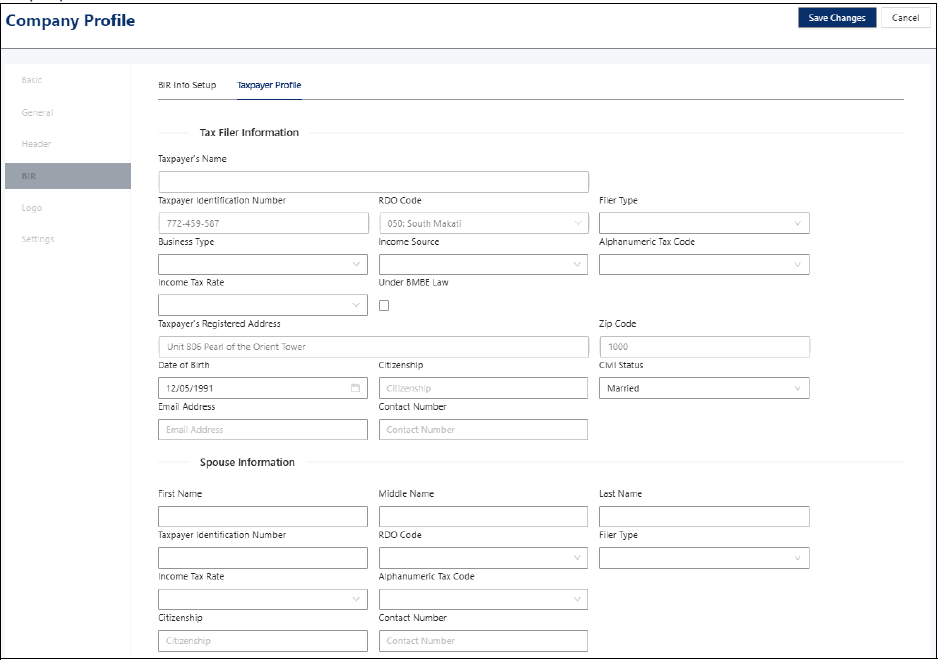
Complete the remaining applicable fields > Click Save Changes.
Notes:
Individual and Non-Individual refer to the classification of the company, not the system user.
Fields that cannot be edited are automatically sourced from BIR Info Setup and existing Company Profile information.
Only the remaining fields need to be reviewed and completed, most of which are optional depending on the company’s tax situation.
For companies classified as Individual, Spouse Information is displayed and required only when Civil Status is set to Married. If the Civil Status is Single, Widow/er, or Legally Separated, only the Tax Filer Information needs to be completed.
Taxpayer Profile will be the details to be shown on the BIR Forms.
Application:
Cost Stability: Maintain consistent taxpayer information across BIR forms and reports.
Compliance Readiness: Ensure required taxpayer details are readily available for tax filing and audits.
Data Accuracy: Reduce errors by sourcing key fields from the existing Company Profile and BIR setup.
Process Efficiency: Minimize repetitive data entry when generating tax-related documents.
Reporting Consistency: Support an accurate and standardized population of taxpayer details in BIR-related processes.

Was this article helpful?
That’s Great!
Thank you for your feedback
Sorry! We couldn't be helpful
Thank you for your feedback
Feedback sent
We appreciate your effort and will try to fix the article