Overview:
If you've forgotten your N3 AI Accounting password, there's no need to worry. N3 provides a secure and straightforward way to reset your password and regain access to your account. This guide walks you through the reset process and offers practical examples of when and why you might need to use it.
Scenario:
You are a user of N3 AI Accounting and are unable to log in due to a forgotten password. You no longer have access to your saved credentials or password manager and must reset the password using your registered email address.
This scenario commonly happens when:
You’ve recently changed your password and can’t recall the update.
You’ve cleared your saved login data or switched to a new device.
Procedure:
To reset a forgotten password in N3 AI Accounting, follow these steps:
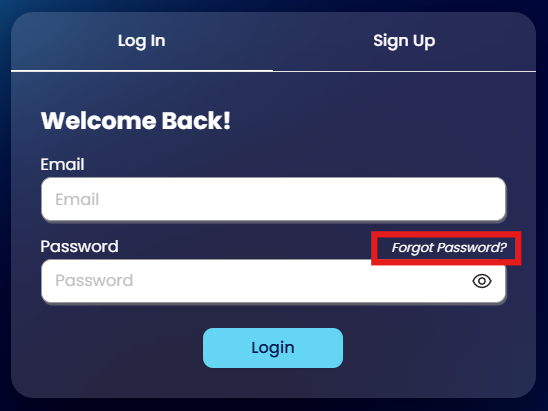
On the N3 AI Accounting login page, click the Forgot Password? link located below the email field.
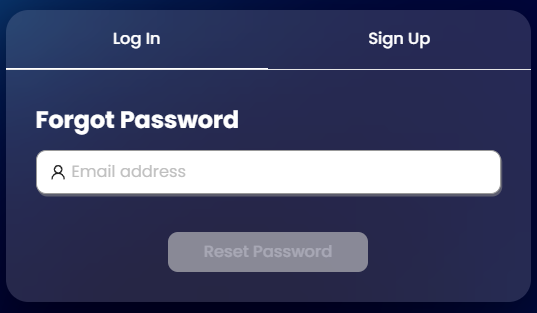
Type in the email address associated with your N3 AI Accounting user account. This should be the same email your system administrator or owner used when inviting you to the system. Then, click Reset Password.
A message will appear confirming that a password reset email has been sent to your inbox.
Check your inbox for your new password. Look for an email from QNE with the subject line “Reset Password – Your password has been reset”. If you don’t see it in your
inbox, check your spam or junk folder.
You’re done! Use the system-generated password from the email to log in to N3 AI Accounting.
Note: You may continue using the system-generated password. If you prefer to set a custom password, refer to the article.
How to Change Password


Application:
Here are common real-world scenarios where the password reset process is especially useful:
New Device Login After Office Relocation
After transferring to a new office or setting up a new device, previously saved login credentials may no longer be available. By using the password reset feature, users can quickly regain access to N3 AI Accounting without needing assistance from IT or their administrator.Forgotten Credentials During a Critical Task
After transferring to a new office or setting up a new device, previously saved login credentials may no longer be available. By using the password reset feature, users can quickly regain access to N3 AI Accounting without needing assistance from IT or their administrator.Password Manager Was Reset or Lost
A user relying on a browser-based password manager accidentally clears their saved data. Instead of reaching out for support, they initiate the reset procedure and restore access independently and securely.
These examples highlight how N3 AI Accounting’s password recovery process is designed to minimize downtime and maintain productivity.
System Scope: N3 AI Accounting (formerly QNE AI Cloud Accounting)
Was this article helpful?
That’s Great!
Thank you for your feedback
Sorry! We couldn't be helpful
Thank you for your feedback
Feedback sent
We appreciate your effort and will try to fix the article