Overview:
A Purchase Requisition (PR) is an internal document used by employees to formally request the purchase of goods or services before a Purchase Order is issued to a supplier. In N3 AI Accounting, creating a Purchase Requisition helps organizations maintain proper approval workflows, monitor purchasing needs, and ensure that procurement activities are properly documented before committing to suppliers.
This process improves transparency and allows departments to formally request items while giving management visibility and control over company spending.
This feature is typically used by department staff, purchasing officers, or managers who need to request items before procurement proceeds.
Scenario:
A department in the company needs to purchase office supplies such as printer ink and paper. Instead of immediately issuing a Purchase Order, the staff member creates a Purchase Requisition in N3 AI Accounting to submit the request for approval. Once approved, the purchasing team can proceed with issuing a Purchase Order to the selected supplier.
Procedure:
1. In the navigation pane, go to the Purchasing > Purchase Requisition > click Add.
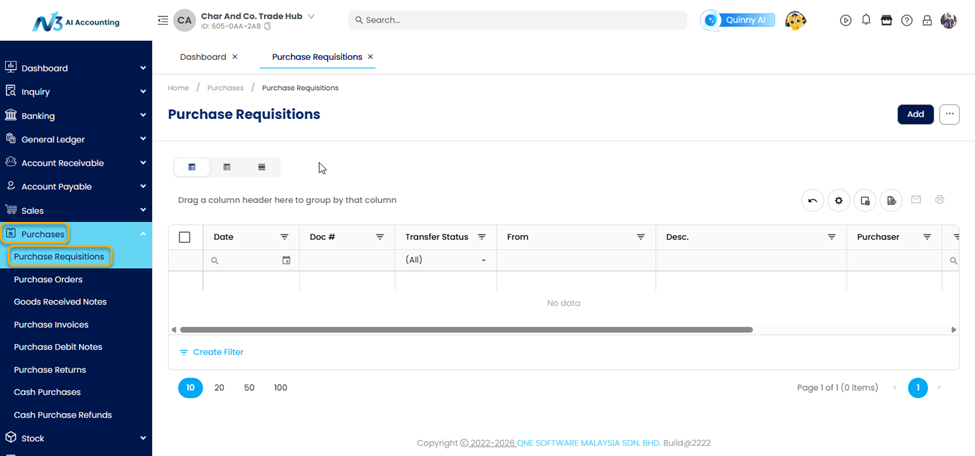
2. Click Add to open a new transaction form.

3. Enter the Requisition Details and the Requested Item/s:
Select the Supplier code
Document Date – Date the requisition is created.
Required Date – Date the items are needed.
Reference Number – Optional internal reference.
Fill-up the Description and the other fields if necessary
Select the Item Code or Item Name.
Enter the Quantity required.
Add a Description if additional details are needed.
Specify any remarks or special instructions for the request, if any.
4. Verify that the item details, quantities, and required dates are correct before saving.
5. Click Save to record the requisition. The document can now be submitted for approval or used as a reference when creating a Purchase Order.
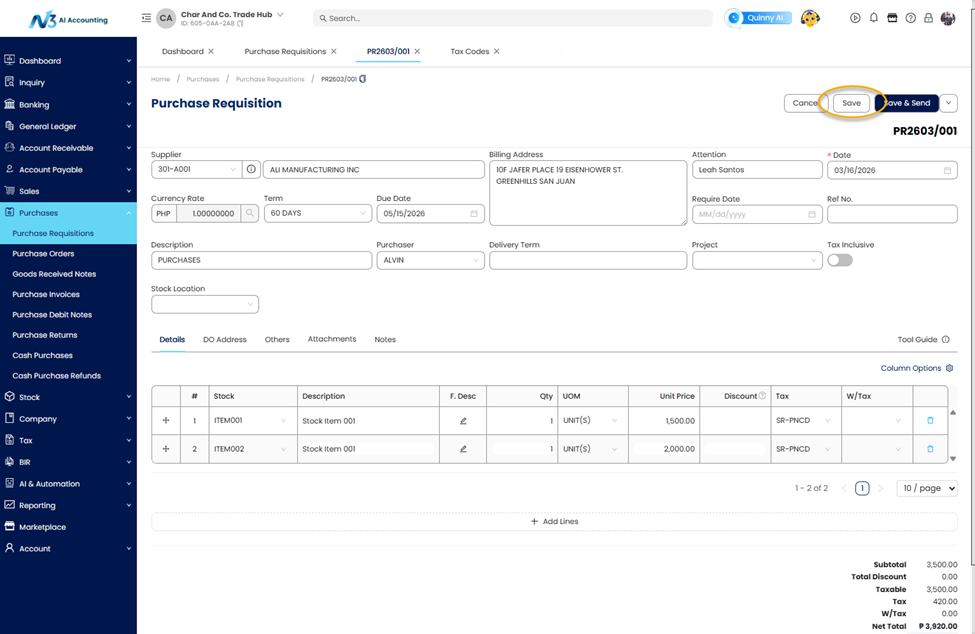
6. After saving, the Purchase Requisition will be recorded in the system and can be reviewed, approved, or converted into a Purchase Order when needed.
Application:
Example 1: Office Supply Request
The Administrative Department needs additional office supplies. A staff member creates a Purchase Requisition requesting:
5 boxes of A4 bond paper
2 units of printer ink
The requisition is reviewed and approved by the purchasing manager before a Purchase Order is issued to the supplier.
Example 2: Equipment Replacement
The IT Department requires a replacement monitor for an employee workstation. The technician creates a Purchase Requisition specifying:
1 unit LED Monitor
Required within the week
After approval, the procurement team proceeds with vendor selection and generates the corresponding Purchase Order.
Example 3: Departmental Budget Control
A department requests materials for a project. By creating a Purchase Requisition first, management can review the request, confirm budget availability, and approve the purchase before any commitment is made with suppliers.
Example 4: Project Material Request
A project manager requires materials for a construction or operational project. By creating a Purchase Requisition, the request can be reviewed against the project budget before purchasing proceeds.
System Scope: QNE AI Cloud Accounting / N3 AI Accounting
Was this article helpful?
That’s Great!
Thank you for your feedback
Sorry! We couldn't be helpful
Thank you for your feedback
Feedback sent
We appreciate your effort and will try to fix the article