Overview:
The Remittance of EWT feature is used to record details of Expanded Withholding Tax (EWT) payments that have been remitted. It allows users to document remittance references, record amendments to previously filed returns, and enter applicable penalties when necessary.
This feature is typically used by accounting or finance personnel responsible for maintaining withholding tax remittance records and ensuring that supporting data is properly captured for related tax reports.
The Remittance of EWT form also serves as a supporting data source when preparing BIR Form 0619-E, particularly when recording amended returns or penalties.
Scenario:
A company completes its monthly EWT remittance through an authorized payment channel. After the payment is completed, the accounting staff records the remittance details such as payment date, reference number, and any applicable adjustments or penalties in the Remittance of EWT form. This helps ensure that remittance records are complete before generating related tax forms.
This scenario is provided for illustration only. Actual workflows may vary depending on company procedures.
Procedure:
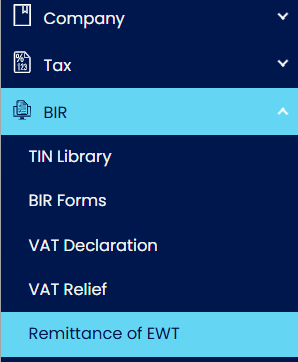
Navigate to BIR > Remittance of EWT.
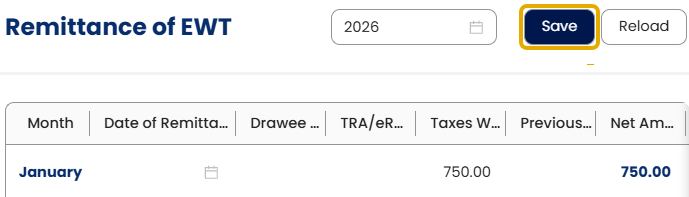
Select the working year.

Locate the row corresponding to the applicable month (January to December).
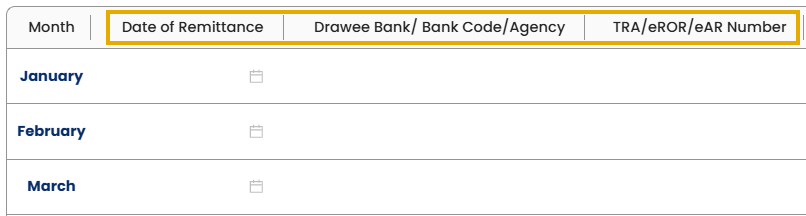
Enter the remittance reference details:
Date of Remittance
Drawee Bank/Bank Code/Agency
TRA/eROR/eAR Number
Review the Taxes Withheld (Item 14).

Note: This amount is automatically populated by the system based on recorded transactions.
If the return is amended, enter the amount under Previously Amount Remitted (Amended) (Item 15).

Review the system-computed values:
Net Amount of Remittance (Item 16)
Penalties (Item 17D)
Amount Remitted (Item 18)

Note: These values are automatically calculated based on the entered data.
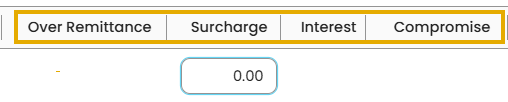
If applicable, enter additional adjustment details:
Over Remittance
Surcharge (Item 17A)
Interest (Item 17B)
Compromise (Item 17C)
Verify that all entered and calculated values are correct.
Save the remittance record according to your standard process.
Notes
Data dependency with BIR Form 0619-E
If the return is amended or includes penalties, record the applicable amounts in the Remittance of EWT form before generating BIR Form 0619-E. This helps ensure that the generated form reflects the correct remittance and penalty values.
Related Information
Application:
The Remittance of EWT feature can be used to:
Maintain organized records of monthly EWT remittances
Record payment reference information for tracking purposes
Document amendments to previously filed remittances
Record penalty amounts related to adjustments or late remittances
Support preparation of related withholding tax forms
Improve consistency of tax remittance documentation
System Scope: QNE AI Cloud Accounting / N3 AI Accounting
Was this article helpful?
That’s Great!
Thank you for your feedback
Sorry! We couldn't be helpful
Thank you for your feedback
Feedback sent
We appreciate your effort and will try to fix the article