Overview:
The Generate 1601-EQ DAT and Excel Files feature in QNE AI Cloud Accounting allows users to prepare the required Quarterly Alphalist of Payees (QAP) files for BIR Form 1601-EQ (Expanded Withholding Tax).
This feature generates:
A DAT file for submission through the BIR eSubmission facility
An Excel file for review, reconciliation, and internal documentation
It is designed for accountants, bookkeepers, and finance staff responsible for withholding tax compliance. By generating these files directly from recorded transactions, the system helps reduce manual encoding, minimize errors, and ensure consistency with reported data.
BIR Form 1601-EQ is the quarterly return used to report Expanded Withholding Tax (EWT) on payments to suppliers, professionals, and service providers.
Scenario:
A company records payments for professional fees and rental expenses that are subject to Expanded Withholding Tax (EWT).
At the end of the quarter, the accounting staff must file BIR Form 1601-EQ and submit the required Quarterly Alphalist of Payees (QAP).
Since all transactions are already recorded in QNE AI Cloud Accounting with the correct tax codes, the staff generates the DAT file for required submission to the BIR and an Excel file to review totals and validate the data before filing.
Procedure:
Follow these steps to generate 1601-EQ DAT and Excel files:
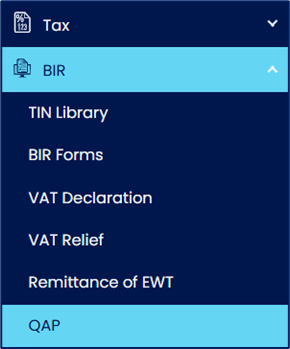
1. Access the QAP Module
Go to BIR > QAP.
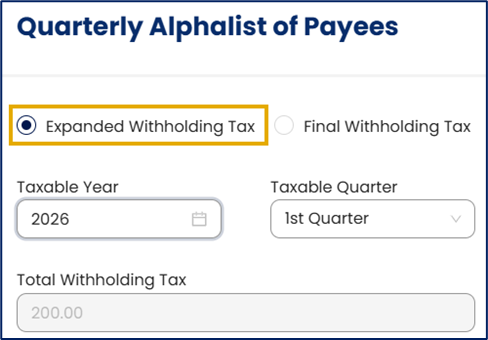
2. Set Report Parameters
Select the following:
Expanded Withholding Tax
Taxable Year
Taxable Quarter
3. Generate the DAT File
Click Generate 1601EQ DAT File.

The system downloads three DAT files (one for each month within the selected quarter), as required for BIR alphalist submission.
4. Validate the DAT File
Open each downloaded DAT file using a text editor (e.g., Notepad), and verify:
Payee TIN and name
Amounts paid
Taxes withheld
Correct reporting period
5. Generate the Excel File
Select the schedule to export:
Schedule 1 – Payees Subject to Withholding Tax
Schedule 2 – Payees Exempt from Withholding Tax
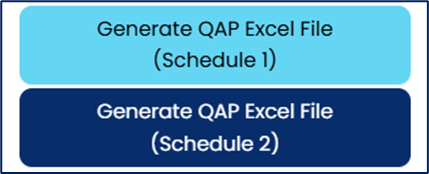
The Excel file is for internal use only and is not accepted for BIR submission.
6. Validate the Excel File
Open the generated Excel file and review:
Total withholding amounts per payee
Transaction-level details
Alignment with recorded EWT transactions
Application:
This feature supports the following use cases:
Prepare compliant 1601-EQ alphalist (DAT) files for quarterly BIR submission
Review and validate withholding tax totals before filing
Reduce manual data encoding and minimize reporting errors
Support audit requirements and tax reconciliations
Maintain organized digital compliance records for tax reporting
System Scope: QNE AI Cloud Accounting / N3 AI Accounting
Was this article helpful?
That’s Great!
Thank you for your feedback
Sorry! We couldn't be helpful
Thank you for your feedback
Feedback sent
We appreciate your effort and will try to fix the article